Everything that happens
before the plate.
Prepress is where a file becomes a plate. It is also the last stage where a problem costs ten minutes instead of a press run.
Not sure the file will print right?
Request a quoteDirect to plate, no film
Omega images plates on a direct-to-plate platesetter, which takes the guesswork out of plate making. The metal plate is imaged directly from the approved file. There is no film in the process at all, and dropping film improves both quality and delivery time.
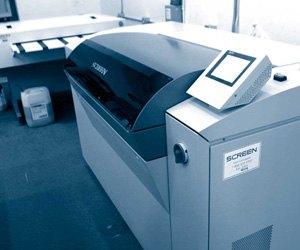
If you have not bought print in twenty years, film was the step in between: the job was output to film, the film was stripped into position by hand, and the plate was exposed through it. Every one of those stages was a chance for the dot to soften and for registration to move. Computer-to-plate removes the middle generation entirely — what is on the plate is what was in the file.
Layout
Omega's prepress handles everything from laying out a simple letterhead to a full-color catalog, on PC and Mac. A company identity, an instruction manual, a price list — prepress is where it starts.
Layout at a printer is not the same job as design. It includes the part designers often do not: imposition — arranging the pages on the press sheet so that once the sheet is folded, stitched and trimmed, they land in reading order and in the right place. A 16-page booklet is not sixteen pages on a press; it is a small number of large sheets with pages ordered in a sequence that looks wrong until it is folded.
High-resolution image scanning is part of it too, for artwork that only exists on paper.
Proofing
Proofs come as an emailed PDF or as a hard copy, whichever the job needs.
- A PDF proof is the fast way to check the things that are absolutely objective: copy, spelling, page order, position, whether the phone number is right. It is not a color proof — you are looking at it on a backlit screen that no printed sheet will ever match.
- A hard copy proof is what you check when color, trim or fold matter. It is paper, in the room, in daylight, at the size the piece will actually be.
A proof is the last point in a job at which a change is free. It is worth twenty careful minutes, and worth showing to whoever will complain afterwards — our guide on what to check on a proof walks through exactly what those minutes should cover.
Preparing a file for print
None of this is specific to us — it is how commercial print works everywhere — but getting it right is the difference between a job that goes straight to plate and a job that comes back with questions. The short version is in our guide to preparing a print-ready file.
- Bleed. Anything meant to run off the edge has to extend 1/8″ (0.125″) past the trim on every side. Trimming a lift of a thousand sheets moves by a hair, and without bleed that hair shows up as a white line down the edge — the bleed & trim calculator turns a trim size into the file setup size for you.
- Safety margin. Keep type and anything else you cannot lose at least 1/8″ inside the trim, for the same reason in the other direction.
- Resolution. Photographs want 300 ppi at final printed size. Line art and scanned type want more, up to 1200 ppi. An image pulled off a website is typically 72 ppi and cannot be sharpened into something it never was — check one with the image resolution checker.
- Color space. Build in CMYK for offset. RGB files convert on the way in, and the brightest RGB blues, greens and oranges shift noticeably when they do — better you see that in your own software than on a press sheet. Name spot colors as Pantone, not as a CMYK approximation, if you want them run as spot.
- Black. Small text should be 100% black only, so it does not need four plates to register on a serif stem. Large solid areas want a rich black — 100% black with process colors behind it — because black ink alone over a big area reads as washed-out charcoal.
- Fonts. Embed them in the PDF or convert type to outlines. A font that is merely installed on your machine is not in the file.
- Export. A press-ready PDF, ideally PDF/X-1a or PDF/X-4. Those presets exist precisely to remove the guesswork — they force embedded fonts and a defined color space. X-1a flattens transparency on export; X-4 carries it live and lets us flatten it here. Either is fine.
- Native files. If you would like us to make changes rather than just print it, send the working files with the linked images and the fonts collected alongside them.
When it is ready, send us the file — the upload handles the large ones that email will refuse.
Where prepress meets the bindery
Two things that look like finishing problems are actually prepress ones. Fold panels on a letter-folded piece are not all the same width — the panel that tucks inside has to be slightly narrower or it buckles at the fold. And on a thick saddle-stitched book, the inner pages push out and get trimmed shorter, so the margins have to be adjusted page by page to compensate. Both get handled here, before plates, not discovered in the bindery afterwards.
Bleed, resolution, fonts and color space, checked before a plate is made and while a fix is still free.
How a file becomes a plate
Artwork ready?
Upload it and we will look at the files before anything is quoted — bleed, resolution, fonts and color space. Questions first: (763) 475-1826.
Good to
know.
What file format should I send?
A press-ready PDF is best — PDF/X-1a or PDF/X-4 if your software offers it, because those presets embed the fonts and pin down the color space for you. If you would like us to make changes, send the native working files with linked images and fonts collected. Either way, send a file handles the big ones.
How much bleed do you need?
1/8″ past the trim on every side, on anything meant to run off the edge — and keep type at least 1/8″ inside the trim. Cutting a thousand sheets at once moves by a hair, and bleed is what absorbs it.
Our logo is a JPEG off the website. Is that good enough?
Usually not. A web image is around 72 ppi at screen size, and enlarging it does not add detail that was never captured. Send vector artwork — an AI, EPS or PDF — or a raster file at 300 ppi at the size it will print. If the only good copy is on paper, high-resolution scanning is part of what prepress does.
Can I see a hard copy proof before it prints?
Yes. Proofs come as an emailed PDF or as a physical hard copy, whichever the job needs. For anything where color, trim or the fold matters, ask for hard copy — a backlit screen will never match a printed sheet.
Do you still use film to make plates?
No. Plates are imaged directly from the file on a Screen direct-to-plate system, with no film step at all. That removes a whole generation of dot from the process, which is why quality and delivery time both improve.
Got a job to price?
Send us the specs and we'll quote it. Or call (763) 475-1826 and talk it through.